BytesMorph PST Email Address Extractor 2.0 (x64)
File Size: 4.7 MB
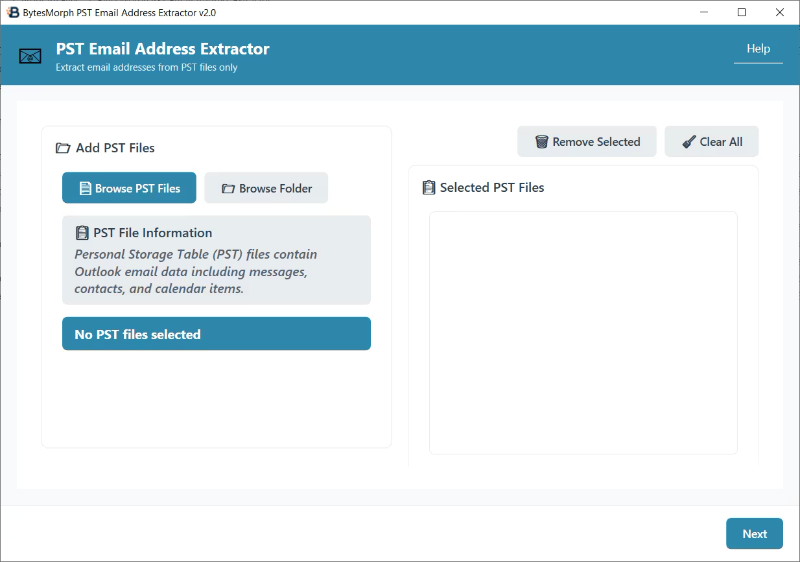
Transform your Outlook PST files into actionable contact lists with BytesMorph PST Email Address Extractor – the specialized tool designed exclusively for PST file processing. Whether you’re migrating from Outlook, building contact databases, or analyzing communication patterns, this professional-grade tool handles PST files with precision and ease.
### PST File Format Support
• Outlook PST Files: Personal Storage Table files from Microsoft Outlook
• All PST Versions: Compatible with PST files from Outlook 97 to Outlook 365
• Large PST Files: Handles PST files of any size efficiently
• Encrypted PST Files: Supports password-protected PST files
### Key Features
• PST-Specific Processing: Optimized exclusively for PST file extraction
• Smart Extraction: Automatically finds email addresses in all message types
• Advanced Validation: Filters out invalid email addresses automatically
• Duplicate Management: Choose to include or exclude duplicate addresses
• Flexible Filtering: Extract from specific address types (From, To, CC, BCC, Reply-To, Sender)
• Domain Grouping: Organize results by email domain for better analysis
• Multiple Export Formats: Save as CSV, JSON, or PDF for easy integration
• Folder-Wise Export: Create separate export files for each PST file automatically
• Message Details: Include email subject, date, sender, and recipient information
• Batch Processing: Handle multiple PST files simultaneously
• Real-time Progress: Monitor extraction progress with detailed status updates
• No File Size Limits: Process PST files of any size efficiently
### Perfect For
• IT Professionals: Outlook to other email system migrations
• Marketing Teams: Building contact lists from Outlook archives
• Legal Professionals: PST file discovery and analysis
• Data Analysts: Outlook communication pattern analysis
• Small Businesses: Outlook contact database management
• Researchers: PST file data extraction for studies
• Outlook Users: Extracting contacts from old PST files
### Easy 3-Step Process
1. Select PST Files: Browse and choose your PST files or folders
2. Configure Settings: Set export options, filters, and output preferences (CSV, JSON, or PDF)
3. Export & Analyze: Get your results in your chosen format(s), with optional folder-wise separation
### ? Professional Features
• Enterprise-Ready: Handles large PST archives efficiently
• Error Handling: Robust processing with detailed error reporting
• Customizable Output: Choose exactly what data to extract
• No Installation Required: Portable executable runs anywhere
• Windows Compatible: Works on Windows 10/11 with .NET Framework 4.8
• PST-Specific UI: Interface optimized for PST file handling
### Data Security
• Local Processing: All data stays on your computer
• No Cloud Upload: Complete privacy and security
• No Registration Required: Start using immediately
• PST File Safety: Original PST files remain unchanged
### Export Options
• CSV Format: Perfect for Excel, Google Sheets, and database imports
• JSON Format: Ideal for developers and API integrations
• PDF Format: Professional reports with formatted tables and headers
• Folder-Wise Export: Automatically create separate files for each PST file
• Customizable Fields: Choose which data to include in exports
• Message Details: Include email subject, date, sender, and recipient info
• Domain Grouping: Organize results by email domain
• Contact Information: Extract display names and contact details
### Folder-Wise Export Feature
• Automatic Organization: When enabled, creates separate export files for each PST file
• Smart File Naming: Each file is prefixed with the PST file name (e.g.,
MyPST_email_addresses.csv
)
• Batch Processing: Process multiple PST files and get organized results automatically
• Perfect for Archives: Ideal when you need to keep data from different PST files separate
• All Formats Supported: Works with CSV, JSON, and PDF exports
• Easy Management: Quickly identify which export file corresponds to which PST file
 What’s New
official site does not provide any info about changes in this version.
⋆🕷- – – – -☽───⛧ ⤝❖⤞ ⛧───☾ – – – -🕷⋆
 ️ BytesMorph PST Email Address Extractor 2.0 (x64) – (5 MB)
ClickNUpload Link(s)
Code:Copy to clipboard
https://clicknupload.click/6cd84ev4xdhp
RapidGator Link(s)
Code:Copy to clipboard
https://rapidgator.net/file/a153f85aca9c445fa6e2d7122550b83f/BytesMorph.PST.Email.Address.Extractor.2.0.X64.rar
Freedl.ink Link(s)
Code:Copy to clipboard
https://frdl.io/gzc6am6gicl8/BytesMorph.PST.Email.Address.Extractor.2.0.X64.rar

 5.8 (31,536 Votes)