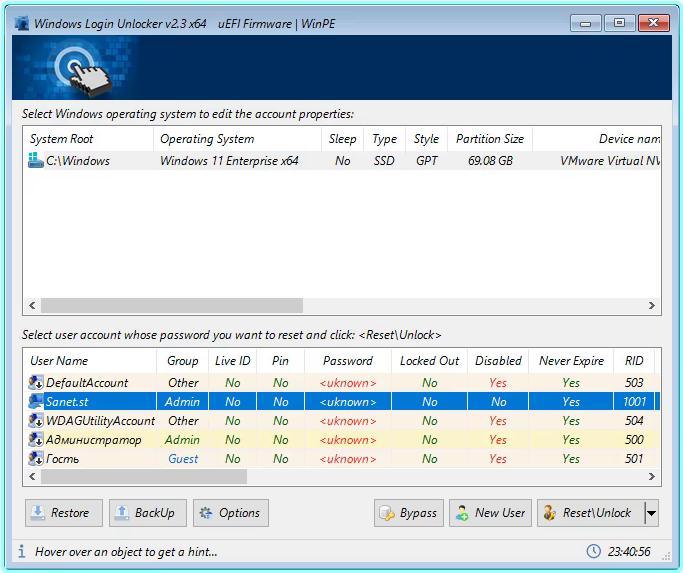
Windows Login Unlocker 2.3.6404 (x86)-x64 Multilingual WinPE

Windows Login Unlocker 2.3.6404 (x86)-x64 Multilingual WinPE​
Language: English, French, Spanish, Dutch, Chinese, Ukrainian, Russian | File Size: 194 MB / 256 MB​

The program is designed to reset, change passwords or unlock Windows accounts. With its help, you can restore access to any Windows account, be it a local profile or a Microsoft account. Allows you to regain access without damaging system files and reinstalling the system.

Advantages

  • There is a version x86, x64, for launching or adding to your version of WinPE
  • All actions are performed in the main program window.
  • You can control the program with only the mouse or only the keyboard, or both.
  • Lots of different information about the user account.
  • Resetting local user password and Microsoft LiveID accounts
  • Removing restrictions and blocking from your account
  • Clearing login history and incorrect passwords
  • The program works with any Windows operating system (except active)
  • Mounting and processing VHD container.
  • Warning if the system is in FastBoot mode
  • Installation of bypass from nikzzzz, to log into your account without knowing or entering a password.
  • When you first start the program, a backup copy of the user database is created, then this can be done manually.
  • You can remove changes by restoring the user database from a backup.
  • Correct creation of a new System User (with Administrator rights)
  • Unicode support (there will be no cracker)
  • User names, descriptions and group names will be displayed in the national language, without distortion.
  • Running not only in WinPE, but also in Windows operating systems

Below you will find a boot image based on Windows10PE v2004 x64 with the Windows Login Unlocker v2.0 program, as well as a separate Windows Login Unlocker v2.0 program for integration into your WinPE.
Plugins for adding to your WinPE x86 and x64 build or running from the system.

β‹†πŸ•·- – – – -β˜½β”€β”€β”€β›§ β€β–β€ž β›§β”€β”€β”€β˜Ύ – – – -πŸ•·β‹†β€‹

️ Windows Login Unlocker 2.3.6404 (x86)-x64 Multilingual WinPE (451.74 MB)
ClickNUpload Link(s)
Code:Copy to clipboard

https://clicknupload.click/zz1cl1a5tmcv

RapidGator Link(s)
Code:Copy to clipboard
https://rapidgator.net/file/82f2d52efccfa872fad7fca105000196/Windows.Login.Unlocker.2.3.6404.X86-x64.Multilingual.WinPE.rar

Windows Firewall Control 6.23 Multilingual – (4 MB)

Windows Firewall Control 6.23 Multilingual​
File size: 3.4 MB​

Windows Firewall Control is a powerful tool which extends the functionality of Windows Firewall and provides new extra features which makes Windows Firewall better. It runs in the system tray and allows the user to control the native firewall easily without having to waste time by navigating to the specific part of the firewall. This is the best tool to manage the native firewall from Windows 11, 10, 8.1, 8, 7, Server 2016, Server 2012.

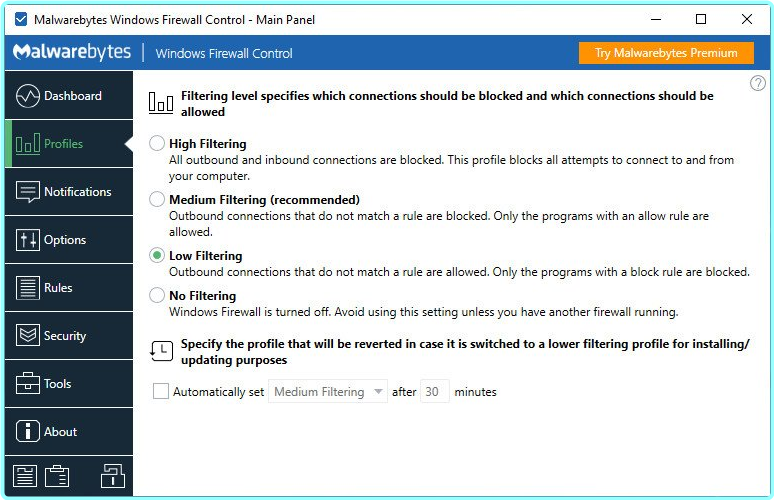
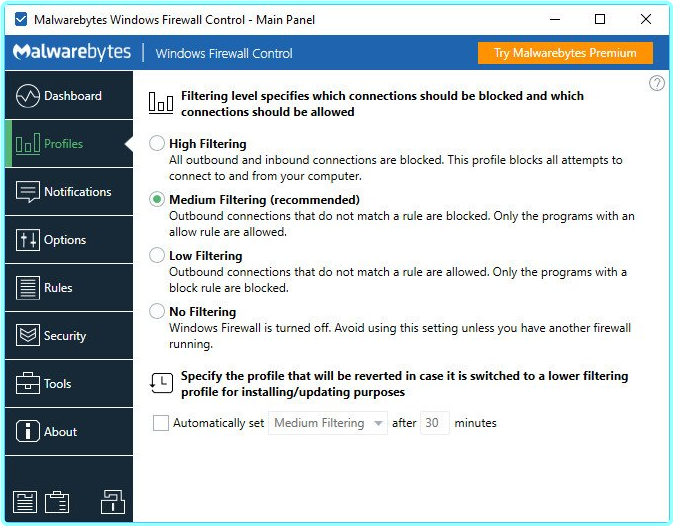
Windows Firewall Control offers four filtering modes which can be switched with just a mouse click
High Filtering – All outbound and inbound connections are blocked. This profile blocks all attempts to connect to and from your computer.
Medium Filtering – Outbound connections that do not match a rule are blocked. Only the programs that you allow can initiate outbound connections.
Low Filtering – Outbound connections that do not match a rule are allowed. The user can block the programs he doesn’t want to allow initiating outbound connections.
No Filtering – Windows Firewall is turned off. Avoid using this setting unless you have another firewall running on your computer.
Windows Firewall Control doesn’t do any packet filtering and does not block or allow any connection. This is done by Windows Firewall itself based on the existing firewall rules.

Program Features

  • Notifications of outbound blocked connections.
  • Learning mode that automatically allows digitally signed programs.
  • Create temporary rules which are automatically deleted when they expire or on program restart.
  • Intuitive user interface which is easy accessible through a system tray icon.
  • Full support with standard user accounts. Elevated privileges are required only at installation.
  • Disable the ability of other programs to tamper Windows Firewall rules and state.
  • Integrated support of creating, modifying and deleting Window Firewall rules.
  • Multiple and easier ways of creating new rules in Windows Firewall.
  • Lock feature which can disable the access to the settings of the program and Windows Firewall.
  • Shell integration into the right click context menu of the executable files.
  • Automatically display invalid rules for programs that do not exist any more.
  • Possibility to find and display duplicate firewall rules.
  • Merge multiple similar rules or duplicate existing ones.
  • View recently allowed and blocked connections and create new rules from the Security log.
  • Import and export of partial sets of rules.
  • Protection to unauthorized uninstallation.
  • Possibility to restore previous settings at uninstallation.
  • Global hot keys are supported and various shortcut keys are available.
  • Integrated multi language support in 29 languages.
  • And many, many more. Just try it out.

Code:Copy to clipboard

https://www.binisoft.org/changelog.txt

β‹†πŸ•·- – – – -β˜½β”€β”€β”€β›§ β€β–β€ž β›§β”€β”€β”€β˜Ύ – – – -πŸ•·β‹†β€‹

️ Windows Firewall Control 6.23 Multilingual – (4 MB)
RapidGator Link(s)
Code:Copy to clipboard
https://rapidgator.net/file/5e518a5718207730a8f5499106f78cc4/Windows.Firewall.Control.6.23.Multilingual.rar

Freedl.ink Link(s)
Code:Copy to clipboard

https://frdl.io/uvglz3wh7uck/Windows.Firewall.Control.6.23.Multilingual.rar

Windows Firewall Control 6.18.0.0 Repack & Portable by Elchupacabra

Windows Firewall Control 6.18.0.0​

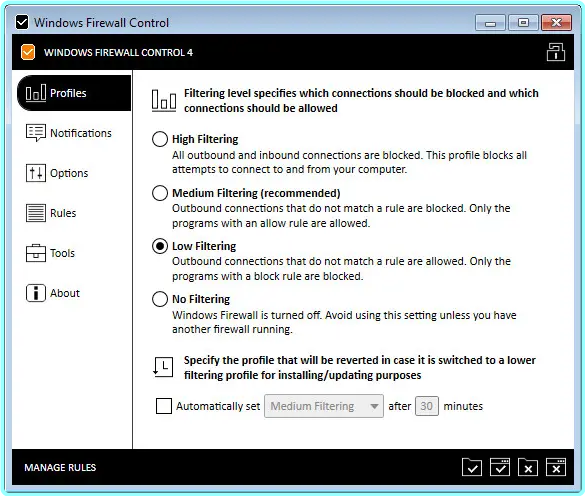
Windows Firewall Control is a powerful software which extends the functionality of Windows Firewall and provides new extra features which makes Windows Firewall even better. It runs in the system tray and allows the user to control the native firewall easily without having to waste time by navigating to the specific part of the firewall.

Quick access from the tray icon
Once initialized, the app creates an icon in the system tray area and allows you to select the security profile, ranging from no filtering (turns off Windows Firewall) to high filtering mode (blocks all inbound and outbound connections).

Thorough management of application connections
When it comes to rules management, you can allow or deny access to any application, disable, delete it from the list or create a duplicate. The list shows names, groups, programs, locations, statuses, actions, directions, locate and remote ports, remote addresses, protocols, and services.

Populate permission lists with custom apps
It is possible to sort items by status or direction (inbound, outbound, all, user-created), use a search function, view recently blocked programs, as well as switch to a simplified viewing mode for enabling and disabling program access, as well as for adding a new app to the list.

Rich settings to work with
Windows Firewall Control features a control panel where you can make additional tweaks. You can integrate the tool into the Explorer context menu, set it to autorun at startup, disable other programs from adding firewall rules, activate global hotkeys for the control panel and rules management area, adjust the frame’s hue, import and export rules, as well as access some Windows tools (Firewall with Advanced Security, Command Prompt, Event Viewer, Resource Monitor, Windows Registry).

To end with
All in all, the application has a fair reaction speed and works smoothly, without causing any problems to the OS. It quickly applies rule changes. Windows Firewall Control is an excellent utility for a better control over Windows Firewall options, especially when it comes to setting up rules for each program.

Code:Copy to clipboard

https://www.binisoft.org/changelog.txt

β‹†πŸ•·- – – – -β˜½β”€β”€β”€β›§ β€β–β€ž β›§β”€β”€β”€β˜Ύ – – – -πŸ•·β‹†β€‹

️ Windows Firewall Control 6.18.0.0 Repack & Portable by Elchupacabra (2.4 MB)
ClickNUpload Link(s)
Code:Copy to clipboard

https://clicknupload.click/a28hvwozshsc

RapidGator Link(s)
Code:Copy to clipboard
https://rapidgator.net/file/fa7cf36d7f5d12829adf62a06ebb63d3/Windows.Firewall.Control.6.18.0.0.rar

Windows Firewall Control 6.17.0.0 Repack & Portable by Elchupacabra

Windows Firewall Control 6.17.0.0​

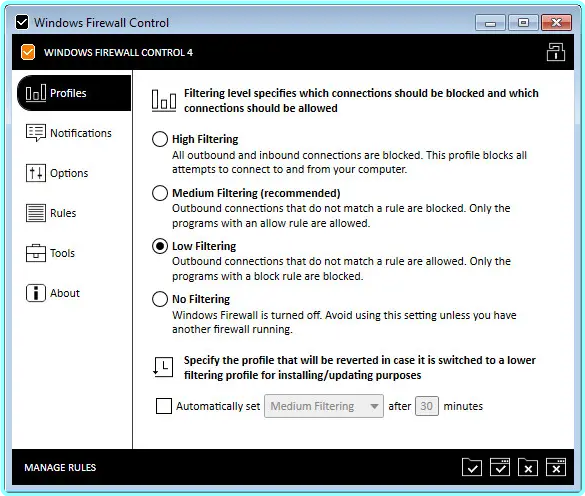
Windows Firewall Control is a nifty little application which extends the functionality of the Windows Firewall and provides quick access to the most frequent options of Windows Firewall. It runs in the system tray and allows user to control the native firewall easily without having to waste time by navigating to the specific part of the firewall.

Windows Firewall Control offers four filtering modes which can be switched with just a mouse click:

High Filtering – All outbound and inbound connections are blocked. This setting blocks all attempts to connect to and from your computer.
Medium Filtering – Outbound connections that do not match a rule are blocked. Only programs you allow can initiate outbound connections.
Low Filtering – Outbound connections that do not match a rule are allowed. The user can block the programs he doesn’t want to initiate outbound connections.
No Filtering – Windows Firewall is turned off. Avoid using this setting unless you have another firewall running on your computer.

Program Features
√ Just one small executable file. All features are packed in the same file.
√ Intuitive and easy accessible interface in the system tray.
√ Full support with standard user accounts.
√ Possibility to create temporary rules.
√ Disable the ability of other programs to add Windows Firewall rules.
√ Multiple and easier ways of creating new rules in Windows Firewall.
√ Full support of creating, modifying and deleting Window Firewall rules.
√ Lock feature which can disable the access to the settings of the program.
√ Shell integration into the right click context menu of the executable files.
√ Search for invalid rules with the possibility to delete them.
√ Search for executable files through folders and create new rules in seconds.
√ View recently blocked connections and create new rules from the log.
√ Choose if you want the program to start at user logon.
√ Import and export the settings of the program.
√ Protection to unauthorized uninstallation.
√ Possibility to restore previous settings at uninstallation.
√ And many more. Just try it out.

System Requirements
√ Microsoft .NET Framework version 4.5 or newer version
√ Compatible with all x86 and x64 versions of Windows 10, 8.1, 8, 7, Server 2016, Server 2012.
√ Windows Firewall service is required to be enabled for Windows Firewall Control to run.
√ DNS Client service is required to be enabled for the notifications to work properly.

Home Page – Code:Copy to clipboard

http://www.binisoft.org/

β‹†πŸ•·- – – – -β˜½β”€β”€β”€β›§ β€β–β€ž β›§β”€β”€β”€β˜Ύ – – – -πŸ•·β‹†β€‹

️ Windows Firewall Control 6.17.0.0 Repack & Portable by Elchupacabra (2.39 MB)

ClickNUpload Link(s)
Code:Copy to clipboard

https://clicknupload.click/qvsmdkkl3mgq

RapidGator Link(s)
Code:Copy to clipboard
https://rapidgator.net/file/95058078a43789be33a6093ec28f6d37/Windows.Firewall.Control.6.17.0.0.rar

Windows Firewall Control 6.15.0.0 Repack & Portable by Elchupacabra

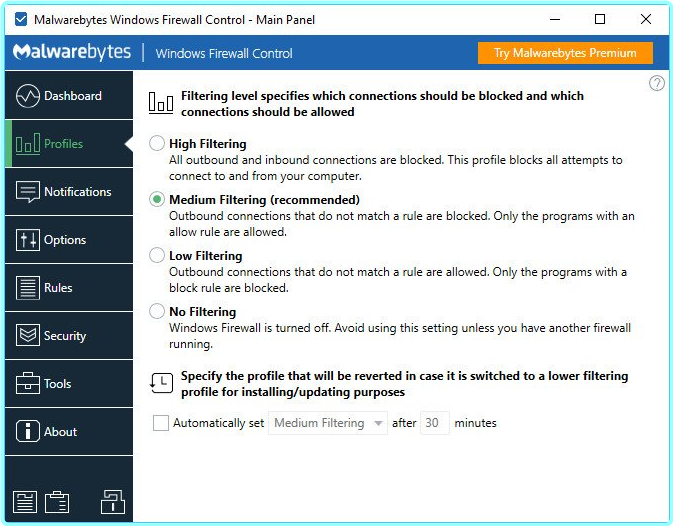
Windows Firewall Control is a nifty little application which extends the functionality of the Windows Firewall and provides quick access to the most frequent options of Windows Firewall. It runs in the system tray and allows user to control the native firewall easily without having to waste time by navigating to the specific part of the firewall.

Windows Firewall Control offers four filtering modes which can be switched with just a mouse click:

High Filtering – All outbound and inbound connections are blocked. This setting blocks all attempts to connect to and from your computer.
Medium Filtering – Outbound connections that do not match a rule are blocked. Only programs you allow can initiate outbound connections.
Low Filtering – Outbound connections that do not match a rule are allowed. The user can block the programs he doesn’t want to initiate outbound connections.
No Filtering – Windows Firewall is turned off. Avoid using this setting unless you have another firewall running on your computer.

Program Features
√ Just one small executable file. All features are packed in the same file.
√ Intuitive and easy accessible interface in the system tray.
√ Full support with standard user accounts.
√ Possibility to create temporary rules.
√ Disable the ability of other programs to add Windows Firewall rules.
√ Multiple and easier ways of creating new rules in Windows Firewall.
√ Full support of creating, modifying and deleting Window Firewall rules.
√ Lock feature which can disable the access to the settings of the program.
√ Shell integration into the right click context menu of the executable files.
√ Search for invalid rules with the possibility to delete them.
√ Search for executable files through folders and create new rules in seconds.
√ View recently blocked connections and create new rules from the log.
√ Choose if you want the program to start at user logon.
√ Import and export the settings of the program.
√ Protection to unauthorized uninstallation.
√ Possibility to restore previous settings at uninstallation.
√ And many more. Just try it out.

System Requirements
√ Microsoft .NET Framework version 4.5 or newer version
√ Compatible with all x86 and x64 versions of Windows 10, 8.1, 8, 7, Server 2016, Server 2012.
√ Windows Firewall service is required to be enabled for Windows Firewall Control to run.
√ DNS Client service is required to be enabled for the notifications to work properly.

Home Page – Code:Copy to clipboard

http://www.binisoft.org/

Windows 8, Windows 10, Windows 8.1, Windows 7

β‹†πŸ•·- – – – -β˜½β”€β”€β”€β›§ β€β–β€ž β›§β”€β”€β”€β˜Ύ – – – -πŸ•·β‹†β€‹

️ Windows Firewall Control 6.15.0.0 Repack & Portable by Elchupacabra (2.39 MB)

UsersDrive Link(s)
Code:Copy to clipboard

https://usersdrive.com/e1nhx8281uvd.html

RapidGator Link(s)
Code:Copy to clipboard
https://rapidgator.net/file/ad6194a27daf586492486dc1a11ecd3e/Windows.Firewall.Control.6.15.0.0.zip

Windows Firewall Control 6.15 Multilingual

File size: 3.0 MB​

Windows Firewall Control is a powerful software which extends the functionality of Windows Firewall and provides new extra features which makes Windows Firewall even better. It runs in the system tray and allows the user to control the native firewall easily without having to waste time by navigating to the specific part of the firewall. This is the best tool to manage the native firewall from Windows 10, 8.1, 8, 7, Vista, Server 2008, Server 2012.

Quick access from the tray icon
Once initialized, the app creates an icon in the system tray area and allows you to select the security profile, ranging from no filtering (turns off Windows Firewall) to high filtering mode (blocks all inbound and outbound connections).

Thorough management of application connections
When it comes to rules management, you can allow or deny access to any application, disable, delete it from the list or create a duplicate. The list shows names, groups, programs, locations, statuses, actions, directions, locate and remote ports, remote addresses, protocols, and services.

Populate permission lists with custom apps
It is possible to sort items by status or direction (inbound, outbound, all, user-created), use a search function, view recently blocked programs, as well as switch to a simplified viewing mode for enabling and disabling program access, as well as for adding a new app to the list.

Rich settings to work with
Windows Firewall Control features a control panel where you can make additional tweaks. You can integrate the tool into the Explorer context menu, set it to autorun at startup, disable other programs from adding firewall rules, activate global hotkeys for the control panel and rules management area, adjust the frame’s hue, import and export rules, as well as access some Windows tools (Firewall with Advanced Security, Command Prompt, Event Viewer, Resource Monitor, Windows Registry).

To end with
All in all, the application has a fair reaction speed and works smoothly, without causing any problems to the OS. It quickly applies rule changes. Windows Firewall Control is an excellent utility for a better control over Windows Firewall options, especially when it comes to setting up rules for each program.

Code:Copy to clipboard

https://www.binisoft.org/changelog.txt

Windows 8, Windows 10, Windows 8.1, Windows 7

β‹†πŸ•·- – – – -β˜½β”€β”€β”€β›§ β€β–β€ž β›§β”€β”€β”€β˜Ύ – – – -πŸ•·β‹†β€‹

️ Windows Firewall Control 6.15 Multilingual (3.39 MB)

UsersDrive Link(s)
Code:Copy to clipboard

https://usersdrive.com/04qbcri9cwgo.html

RapidGator Link(s)
Code:Copy to clipboard

https://rapidgator.net/file/1039e7aca02ff523daee5b8c89e19625/Windows.Firewall.Control.6.15.Multilingual.rar

Windows Firewall Control 6.13.0 Multilingual

File Size: 2.7 MB​

Windows Firewall Control is a powerful software which extends the functionality of Windows Firewall and provides new extra features which makes Windows Firewall even better. It runs in the system tray and allows the user to control the native firewall easily without having to waste time by navigating to the specific part of the firewall. This is the best tool to manage the native firewall from Windows 10, 8.1, 8, 7, Vista, Server 2008, Server 2012.

Windows Firewall Control offers four filtering modes which can be switched with just a mouse click: High Filtering – All outbound and inbound connections are blocked. This profile blocks all attempts to connect to and from your computer.
Medium Filtering – Outbound connections that do not match a rule are blocked. Only the programs that you allow can initiate outbound connections.
Low Filtering – Outbound connections that do not match a rule are allowed. The user can block the programs he doesn’t want to allow initiating outbound connections.
No Filtering – Windows Firewall is turned off. Avoid using this setting unless you have another firewall running on your computer.

Windows Firewall Control doesn’t do any packet filtering and does not block or allow any connection. This is done by Windows Firewall itself based on the existing firewall rules.

Program Features
v Intuitive user interface which is easy accessible through a system tray icon.
v Full support with standard user accounts. Elevated privileges are required only at installation.
v Disable the ability of other programs to add Windows Firewall rules.
v Integrated support of creating, modifying and deleting Window Firewall rules.
v Multiple and easier ways of creating new rules in Windows Firewall.
v Lock feature which can disable the access to the settings of the program and Windows Firewall.
v Shell integration into the right click context menu of the executable files.
v Automatically display invalid rules for programs that do not exist any more.
v Merge multiple similar rules or duplicate existing ones.
v View recently allowed and blocked connections and create new rules from the Security log.
v Import and export of partial sets of rules.
v Protection to unauthorized uninstallation.
v Possibility to restore previous settings at uninstallation.
v Global hot keys are supported and various shortcut keys are available.
v And many, many more. Just try it out.
v Notifications System which provides notifications for outbound blocked connections. Four modes available
High – Display notifications for all outgoing connections that were blocked, including System and svchost.exe.
Medium – Display notifications only for regular programs, without notifications for System and svchost.exe.
Low – Automatically allow digitally signed programs. Notifications are displayed only for unsigned programs.
Disabled – Notifications are disabled.
v Create temporary rules which are automatically deleted when they expire or on program restart.

System Requirements
v Microsoft .NET Framework version 4.5 or newer version
v Compatible with all x86 and x64 versions of Windows 10, 8.1, 8, 7, Vista, Server 2008, Server 2012.
v Windows Firewall service is required to be enabled for Windows Firewall Control to run.
v DNS Client service is required to be enabled for the notifications to work properly.

Known Limitations
v Windows Firewall is incompatible with software proxies, web filtering modules, NDIS drivers.
v Notifications System is incompatible with old versions of BoxCryptor and TrueCrypt.
v Due to multiple system configurations and software installed there may be incompatibility problems. Please report them and help us to improve Windows Firewall Control. Thank you for your support !

Multi language support
Currently, our program is available in 27 languages. If you would like to see the program displayed in your language you can download one of the the translation files that are available. After you select your language from the combo box below, a new download will start for a file with extension *.lng. When the download completes, you have to copy this file in the installation folder, where the file wfc.exe is located. When you restart wfc.exe the new strings will be read from the translation file. The translation file is a plain text file and can easily be edited with any text editor. If you have time and you translate the file to a language which does not appear here, please send it to us too and we will update this page. Thank you.

Windows 10, Windows 8.1, Windows 7, Windows 8

Code:Copy to clipboard

https://www.binisoft.org/

β‹†πŸ•·- – – – -β˜½β”€β”€β”€β›§ β€β–β€ž β›§β”€β”€β”€β˜Ύ – – – -πŸ•·β‹†β€‹

️ Windows Firewall Control 6.13.0 Multilingual (3.4 MB)

Drop Link(s)
Code:Copy to clipboard

https://drop.download/e8sjg1l0tal6/Windows.Firewall.Control.6.13.0.Multilingual.rar

RapidGator Link(s)
Code:Copy to clipboard

https://rapidgator.net/file/e7502d14e9aa5678d470aa985d4dae40/Windows.Firewall.Control.6.13.0.Multilingual.rar

Songs My Brothers Taught Me 2015 Kino 1080p BluRay x264-OFT

Songs My Brothers Taught Me 2015 Kino 1080p BluRay x264-OFT

IMDB information:

Code:Copy to clipboard


https://www.imdb.com/title/tt3566788/

Title: Songs My Brothers Taught Me (2015)
Genres: Drama
Description: With an older brother in jail and living with their single mother on Pine Ridge Reservation, Johnny and his sister Jashuan’s lives develop new challenges when their absentee cowboy father suddenly dies. The loss prompts Johnny to strike out for Los Angeles, but would mean leaving behind his beloved sister.
Director: ChloΓ© Zhao
Writer: ChloΓ© Zhao
Actors: John Reddy, Jashaun St. John, Irene Bedard
Rating: 7.0
Votes: 3939
Rated: Not Rated
Runtime: 98 min

General:
Name: Songs My Brothers Taught Me 2015 Kino 1080p BluRay x264-OFT
Format: mkv
Size: 4.07 GB

Video:
Width: 1920 pixels
Height: 1080 pixels
Format: AVC
Codec: V_MPEG4/ISO/AVC
Duration: 01:33:55
Bit rate: 5760 Kbps
Frame rate: 23.976 fps
Aspect ratio: 16:9
Subtitles: Burmese

Audio:
Audio track: 1
Language: English
Codec: A_AC3
Bit rate: 448 Kbps
Compression: Lossy
Sampling rate: 48 Khz

Download from RapidGator
Code:Copy to clipboard


https://rapidgator.net/file/33b3d8142bb19b4291f56642f579b4c3/Songs.My.Brothers.Taught.Me.2015.Kino.1080p.BluRay.x264-OFT.mkv

Download from Fikper
Code:Copy to clipboard


https://fikper.com/me6K0vQSAr/Songs.My.Brothers.Taught.Me.2015.Kino.1080p.BluRay.x264-OFT.mkv.html

Download from ClickNUpload
Code:Copy to clipboard


https://clicknupload.click/i4p9t2gpc34z/Songs.My.Brothers.Taught.Me.2015.Kino.1080p.BluRay.x264-OFT.mkv

Windows Edge Light V1.10.2 – (68 MB)

Windows Edge Light V1.10.2​
File Size: 65.99 MiB | 64-bit | Language: English​

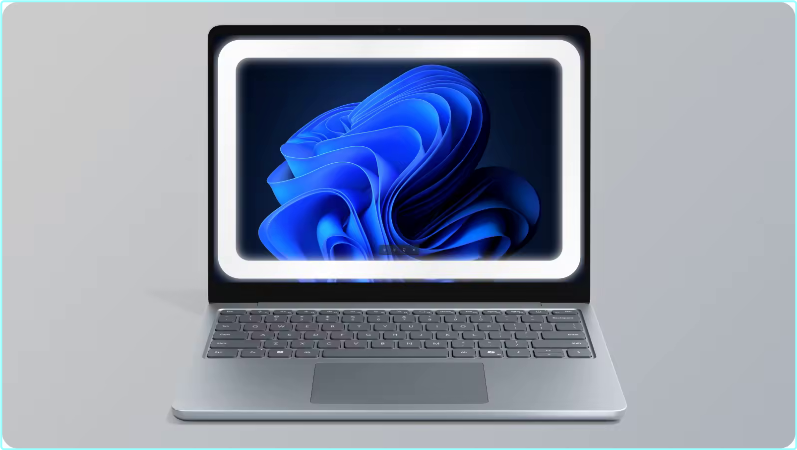
Windows Edge Light is an utility for Windows that turns your computer monitor into a virtual ring light, helping you look brighter and more professional in video calls, recordings, and streams.

A lightweight application that adds a customizable glowing edge light effect around your primary monitor on Windows. Perfect for ambient lighting during video calls, streaming, or just adding a professional touch to your workspace.

Instead of buying a physical LED ring lamp, the software uses your screen to simulate one by displaying a glowing border around your desktop.

Features
System Tray Icon: Right-click for menu with all options
Primary Monitor Display: Automatically detects and fits your main screen
DPI Aware: Works perfectly on 4K displays
Click-Through: Won’t interfere with your work

Requirements: Windows 10, Windows 11

β‹†πŸ•·- – – – -β˜½β”€β”€β”€β›§ β€β–β€ž β›§β”€β”€β”€β˜Ύ – – – -πŸ•·β‹†β€‹

️ Windows Edge Light V1.10.2 – (68 MB)
RapidGator Link(s)
Code:Copy to clipboard

https://rapidgator.net/file/2e8677327597194041b8cf0815d08b4e/Windows.Edge.Light.V1.10.2.rar

Freedl.ink Link(s)
Code:Copy to clipboard
https://frdl.io/hx7431q9gifc/Windows.Edge.Light.V1.10.2.rar

Windows And Office Genuine ISO Verifier 12.25.50.25 (7 MB)

Windows And Office Genuine ISO Verifier 12.25.50.25​
File Size : 7.2 Mb​

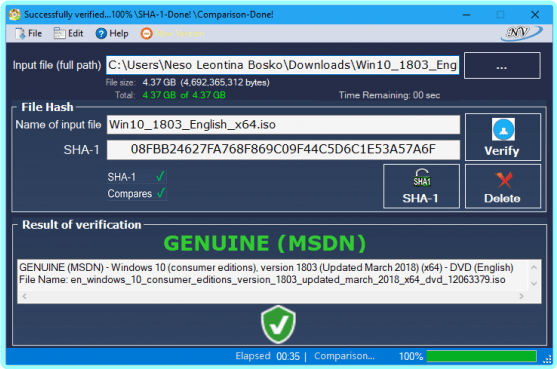
The program allows verification of Windows and Office x32 x64 (ISO, EXE …). Finds ISO hash and compares it with the official hash (MSDN, VLSC).
Windows and Office Genuine ISO Verifier is a lightweight piece of software that enables you to determine whether you have a genuine copy of Windows or Office with minimal effort.

Straightforward installation and intuitive interface
Since the application comes in a portable package, the setup is a quick matter of decompressing the archive in the desired location on your hard disk. However, in case you are having a hard time accessing the file, then you should consider Unblocking the tool from Properties in the context menu.
Even though it is not exactly eye-candy, the interface is user-friendly and unlikely to cause you any real troubles while navigating. In fact, the UI is comprised of a single, medium-size window that features very intuitive fields. Consequentially, functionality-wise, using the tool entails specifying the input file and the app does the rest of the job automatically.
It supports numerous versions and languages of Office and Windows
The strong point of the program stems from the fact that it is designed to recognize a vast array of hashes that are associated with Microsoft’s operating system and Office bundle. To be more precise, the utility can compare file SHA-1 to relatively old Microsoft releases, such as Office 95 and Windows XP.
On a side note, in case you already performed a scan for the file using other third party software solutions, then you can add the SHA-1 in the dedicated field and determine the authenticity of the file on the spot. Then again, verifying an ISO file is not a lengthy process and should not take too much of your time.
A useful app that can spare you legal complications
In the eventuality that you want to reinstall Windows or Office at work or home, but you do not know too much about the file you stumbled across, then perhaps Windows and Office Genuine ISO Verifier can help you determine if you have the genuine copies of the software solutions.
Supported OS’s and Office (MSDN, VLSC…) – Includes x32, x64: (All languages)
Windows 10 (multi-edition) VL, Version 1709 (Upd. Dec 2017)
Windows 10 (multi-edition), Version 1709 (Upd. Dec 2017)
ESD (16299.125.171213-1220.rs3_release_svc_refresh)
—————————————————————————————-
Windows 10 (multi-edition) VL, Version 1709 (Upd. Nov 2017)
Windows 10 (multi-edition), Version 1709 (Upd. Nov 2017)
ESD (16299.15.171109-1522.rs3_release_svc_refresh)
Windows 10 (multi-edition) VL, Version 1709 (Upd. Sept 2017)
Windows 10 (multi-edition), Version 1709 (Upd. Sept 2017)
Windows Server, version 1709
ESD
Windows 10 (1709 RS3) "Fall Creators Update" 16299.15.170928-1534.rs3_releas
Windows 10 – Version 1703 RS2 – MSDN (Updated July 2017)
Windows 10 – Version 1703 RS2 – VLSC (Updated July 2017)
Windows 10 – Version 1703 RS2 – MSDN (Updated June 2017)
Windows 10 – Version 1703 RS2 – VLSC (Updated March 2017)
Windows 10 – Version 1703 RS2 – MSDN (Updated March 2017)
Windows 10 – Version 1607 RS1 – VLSC (Updated Jan 26. 2017)
Windows 10 – Version 1607 RS1 – MSDN (Updated Jan 19. 2017)
Windows 10 – Version 1607 RS1 – "ESD" 14393.0.161119-1705
Windows Server 2016 (x64) – Release Date: 12/01/2017
Windows Server 2016 (x64)
Windows 10 – Version 1607 RS1 – LTSB (Updated Jul 2016)
Windows 10 – Version 1607 RS1 – VLSC (Updated Jul 2016)
Windows 10 – Version 1607 RS1 – MSDN (Updated Jul 2016)
Windows 10 – Version 1511 – VLSC (Updated Apr 2016)
Windows 10 – Version 1511 – MSDN (Updated Apr 2016)
Windows 10 – Version 1511 – MSDN (Updated Feb 2016)
Windows 10 – Version 1511 – VLSC (Updated Feb 2016)
Windows 10 – Version 1511
Windows 10 – Version 1511 VL (VLSC)
Windows 10
Office 2016 RTM (MSDN) and VL (VLSC)
Windows XP
Windows Vista
Windows 7
Windows 8
Windows 8.1
Windows 8.1 with Update
Office 2003
Office 2007
Office 2010 (MSDN) and VL (VLSC)
Office 2013 (MSDN) and VL (VLSC)
Office 2016
Office 95
Windows Advanced Server
Windows Essential Business Server 2008
Windows Home Server
Windows Home Server 2011
Windows Server 2003
Windows Server 2003 R2
Windows Server 2008
Windows Server 2008 R2
Windows Server 2012
Windows Server 2012 Essentials
Windows Server 2012 R2
Windows Server 2012 R2 Essentials
Windows Server 2012 R2 Essentials with Update
Windows Server 2012 R2 with Update
Windows Server Technical Preview
Windows Small Business Server 2008
Windows Small Business Server 2011
Windows Storage Server 2008
Windows Storage Server 2008 R2
Windows Technical Preview
Windows Thin PC
Windows Server Technical Preview 2

Requirements
Microsoft .NET Framework 4.0 Client Profile
OS: Windows XP/ Vista/ Windows 7/ Windows 8/ Windows 8.1/ Windows 8.1 With update/ Windows 10/ Windows 10 – Version 1511 …1703 (x32, x64). Code:Copy to clipboard

https://genuine-iso-verifier.weebly.com/about.html

β‹†πŸ•·- – – – -β˜½β”€β”€β”€β›§ β€β–β€ž β›§β”€β”€β”€β˜Ύ – – – -πŸ•·β‹†β€‹

️ Windows And Office Genuine ISO Verifier 12.25.50.25 (7 MB) [7.24 MB]
ClickNUpload Link(s)
Code:Copy to clipboard
https://clicknupload.click/li2mpdizm4hl

RapidGator Link(s)
Code:Copy to clipboard

https://rapidgator.net/file/598ce0f5c74d2436b7b958ede4b66c04/Windows.And.Office.Genuine.ISO.Verifier.12.25.50.25.rar