Interface language: Russian, English
System requirements:
[ul][li]Windows 10-11 (64-bit)[/li]
[/ul]
Description:
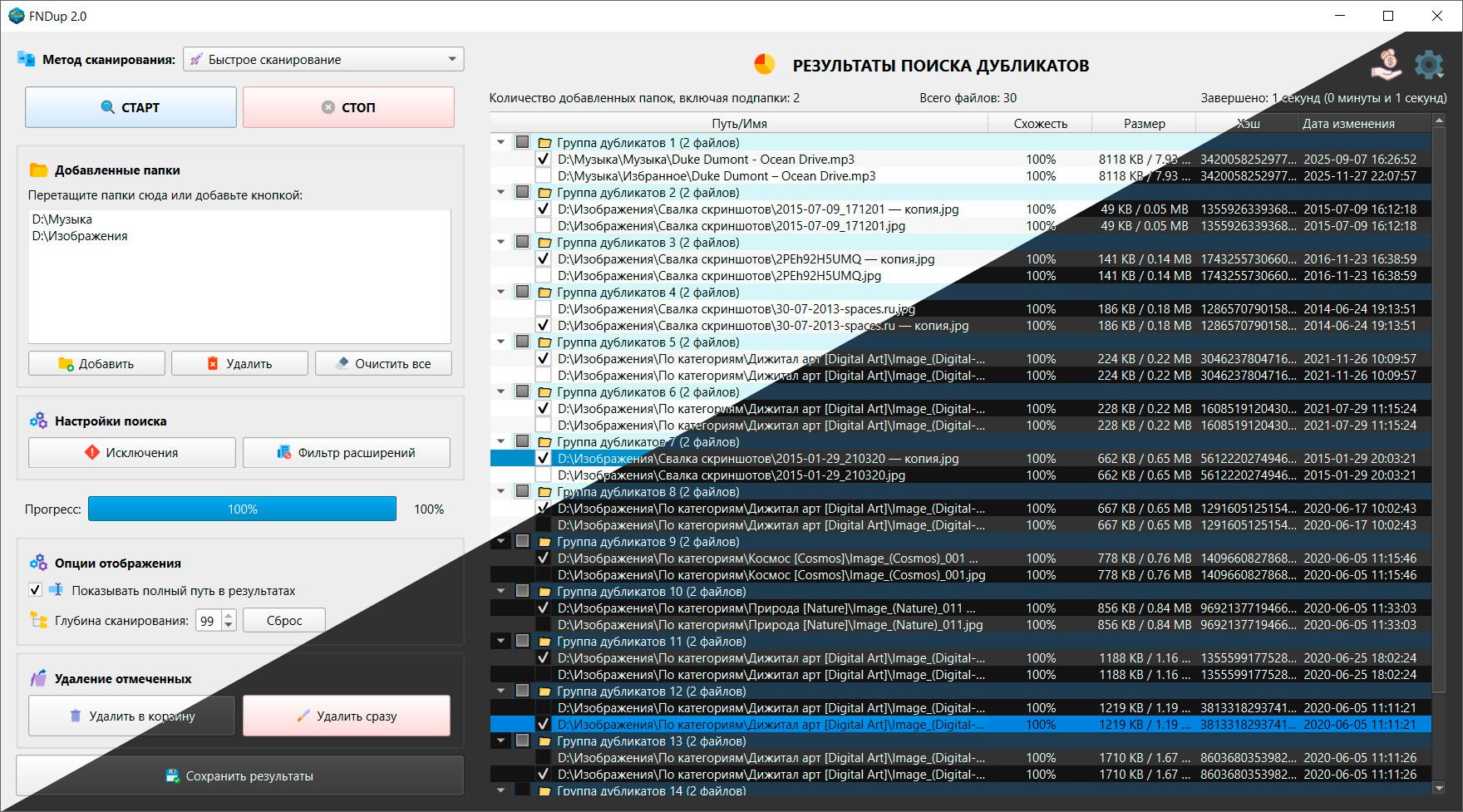
FNDup (Files & Names Duplicate) is a program for finding duplicate files and folders by comparing their names, as well as using the Fast Scan method, which allows you to process large volumes of data in a shorter period of time. Unlike other duplicate search programs, which search for exact duplicates by comparing files byte for byte, FNDup, depending on its method, can quickly find identical duplicates or compare file names with a specified percentage similarity threshold. This allows for more flexible searching and finding similar files or folders, even those that differ by a single letter, word, application version, etc.
Additional information:
FNDup Fast offers two methods for searching for duplicates: Scan and "Scan by Similarity in %" for completely identical files .
[ul][li]method The "Fast Scan" analyzes the initial 8 KB of data to speed up processing, then groups files of similar size. A checksum (hash value) is calculated for these groups using the MD5 algorithm. The duplicate detection accuracy in tests was 100%.
[/li]
[li]method The "Similarity Scan in %" is designed to find similar files based on their names. It is based on the SequenceMatcher algorithm (difflib library), which compares lowercase file names.[/li]
[/ul]
Imagine this: you have a folder with apps, documents, or programs. Over time, if you don’t keep it organized, you could end up with multiple versions of the same apps, programs, or documents, all of which you’ve copied.
For example:
Android applications of different versions:
[ul][li]AirDroid 8.7.6.apk
[/li]
[li]AirDroid 9.4.0 Google Play.apk
[/li]
[li]AirDroid 9.6.1 Pro.apk[/li]
[/ul]
PC programs of different versions:
[ul][li]Adobe Photoshop 2026
[/li]
[li]Adobe Photoshop CS6[/li]
[/ul]
Documents:
[ul][li]Marketing Abstract.docx
[/li]
[li]Marketing copy essay.docx
[/li]
[li]Abstract Marketing copies (2).docx[/li]
[/ul]
Such data won’t be completely identical. Classic programs and methods for finding duplicates in such data won’t detect them. This is where the "Similarity Scan in %" method comes in handy .
You set the sensitivity threshold yourself. For example, with a sensitivity threshold of 80-85%, the program will identify all of the above examples as duplicates.
This method allows you to search not only for files but also for duplicate folders. To optimize speed, the program ignores file pairs whose name lengths differ by more than 20 characters.
Program Features:
[ul][li]Two scanning methods: "Quick Scan" and "Scan by Similarity in %"
[/li]
[li]Flexible filtering system: Support for including and excluding files by extension (images, audio, video, archives, documents) and size (filters "greater than" or "less than" a specified threshold)
[/li]
[li]Exclusion Management: Ability to specify exclusion paths and use wildcards (e.g. *.tmp) to protect system or sensitive workspaces from scanning.
[/li]
[li]Deep scanning settings: The user can limit the scanning depth of folder nesting to optimize the speed of operation.
[/li]
[li]Drag & Drop Support, Dark Theme[/li]
[/ul]
VirusTotal
File: FNDup 2.0.exe
CRC-32: 68867903
SHA-1: 4081b50109f154092b9debd426f594a4c150e757
SHA-256: bff1111d9155ae94b93ec9e83bad8e09293cebcc0b789bedc723f11c563d3179
[свернуть]
What’s new in version 2.0?
[ul][li]Changed : The program interface has been completely redesigned.
[/li]
[li]Added : A new Fast Scan method has been added. It can process gigabytes of information in seconds. In our test, scanning 712GB (126,767 files) took 160 seconds (2 minutes 40 seconds).
[/li]
[li]Added : New columns: "Hash," "Size," and "Modified Date." These columns can be sorted by clicking on them.
[/li]
[li]Added : Grouping duplicates by similarity.
[/li]
[li]Added : "Extension Filter." Now you can search for duplicates of only selected extensions or not search for duplicate files with selected extensions. Pre-defined templates are available by default. This window also now allows you to filter files by size. For example, you can search for files larger or smaller than a specified size.
[/li]
[li]Changed : The "Exclusion List" window has been redesigned. You can now exclude unnecessary folders or files from scanning. Wildcards like * and ? are supported. For example, to exclude all files with the word "date" in their names, you can specify the wildcard date.
[/li]
[li]Added : Scan depth. You can set the scan depth to up to 99 folders. 0 folders means scanning only the selected folder, excluding subfolders.
[/li]
[li]Added : English language
[/li]
[li]Added : Dark theme
[/li]
[li]Added : Drag & Drop support
[/li]
[li]Added : New context menu commands
[/li]
[li]Added : Mini-search for found results via context menu or Ctrl+F
[/li]
[li]Added : Information about the number of duplicates found, the time spent on checking, the number of folders scanned
[/li]
[li]Other minor fixes and improvements[/li]
[/ul]
 ️ FNDup 2.0 – (31 MB)
 RapidGator
Code:Copy to clipboard
https://rapidgator.net/file/5ef0c0c21660c0335c44eef15926c3bf/FNDup.2.0.rar
Freedl.ink
Code:Copy to clipboard